The problem with smart homes
There is a certain irony in building a smart home that becomes useless the moment a single Raspberry Pi decides to fail. I had been running Home Assistant on a standalone VM for years, and while it worked, I found myself increasingly aware of just how fragile the setup was. A failed disk, a corrupted SD card, an unfortunate kernel panic during a firmware update — any of these would leave me fumbling for light switches like it was 1995.
The deeper issue wasn’t technical — it was about consistency. I work with high-availability infrastructure professionally. I have spent years designing systems where single points of failure are considered unacceptable. And yet my own home, the place where I actually live, was running on the digital equivalent of hopes and prayers.
Hence, HAHA was born — Home Assistant High Availability. The acronym was unintentional but too fitting to change.
The architecture
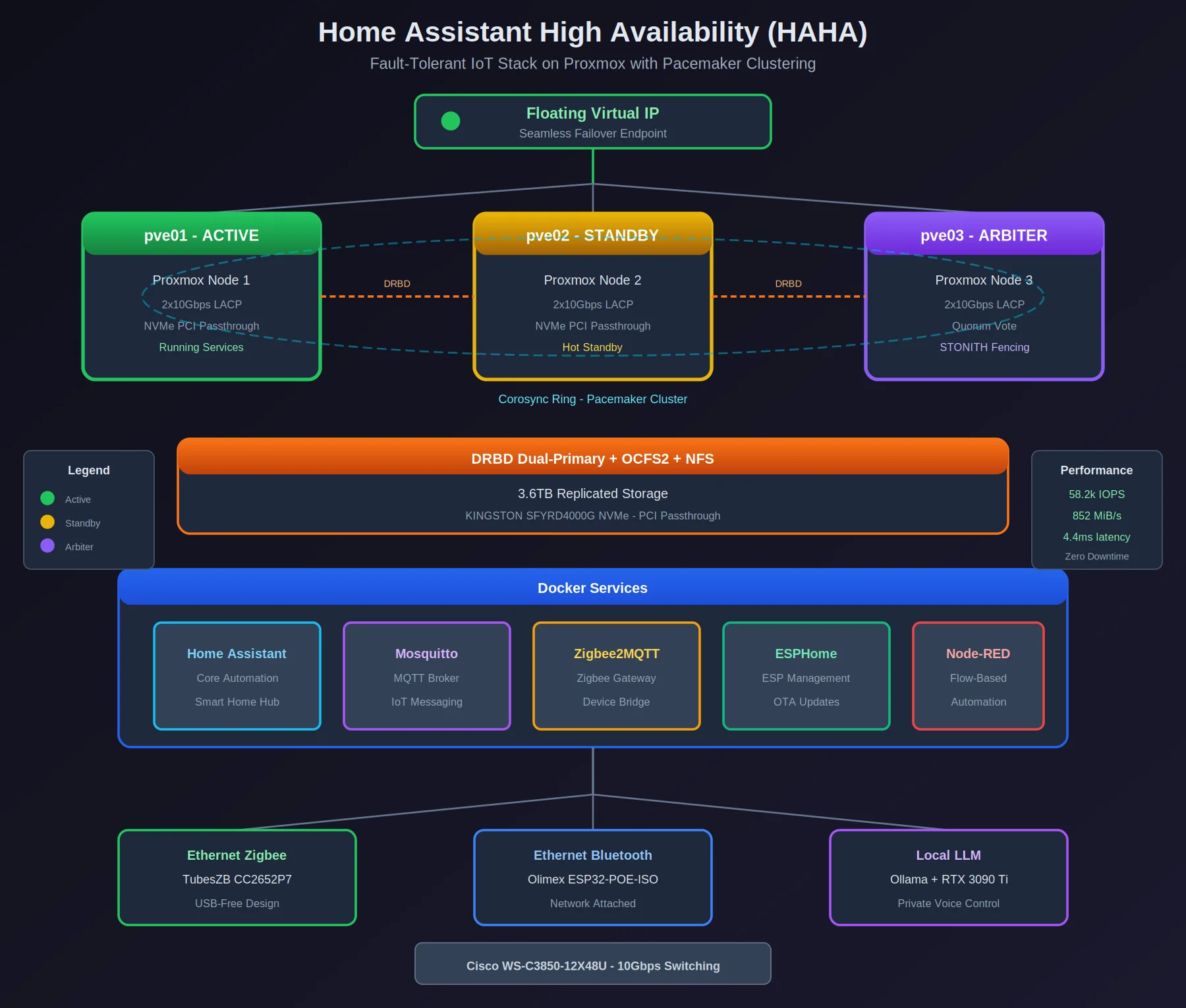
 Three Proxmox nodes, DRBD-replicated storage, Pacemaker clustering, and Ethernet-based IoT peripherals — because USB dongles and failover do not mix.
The foundation is a three-node Proxmox cluster running on dedicated hardware (nllei01pve01, nllei01pve02, nllei01pve03). Each node connects via LACP etherchannel — two 10Gbps links bonded per node — to a Cisco WS-C3850-12X48U switch. The storage layer runs separately: 3.6TB of DRBD in dual-primary mode with OCFS2 as the clustered filesystem, exported via NFS to the compute nodes.
Pacemaker and Corosync handle the clustering orchestration, with STONITH fencing configured to prevent split-brain scenarios. A floating virtual IP moves between nodes, ensuring that services remain accessible regardless of which physical host is currently active.
The services themselves — Home Assistant, Mosquitto, Zigbee2MQTT, ESPHome, and Node-RED — run as Docker containers with their data stored on the NFS-mounted DRBD volumes. When a node fails, Pacemaker relocates the containers to a surviving node, mounts the storage, and assigns the virtual IP. The failover is not instantaneous, but it is automatic and requires no manual intervention.
The USB problem
Early in the project I encountered a challenge that, in retrospect, should have been obvious: USB devices do not fail over gracefully. My Zigbee coordinator and Bluetooth adapter were both USB dongles, and there is simply no clean way to migrate a USB device from one physical host to another without interruption.
The solution was to eliminate USB entirely from the critical path. I replaced the USB Zigbee coordinator with a TubesZB CC2652P7 — an Ethernet-based device that Zigbee2MQTT connects to over TCP. Similarly, the Bluetooth adapter became an Olimex ESP32-POE-ISO running as an ESPHome Bluetooth proxy. Both devices now exist on the network rather than attached to any specific host, meaning failover no longer requires physically moving hardware.
This migration was more disruptive than I had anticipated (re-pairing dozens of Zigbee devices is not my idea of a pleasant weekend), but the result is a setup where the smart home stack can move between nodes without caring about peripheral hardware.
Local voice control
One aspect I was particularly insistent about was avoiding cloud dependencies for voice control. The idea of sending audio recordings of my home to external servers has never sat well with me, regardless of how many privacy policies claim the data is handled responsibly.
The solution is a local LLM running on an RTX 3090 Ti via Ollama, integrated with Home Assistant’s voice assistant pipeline. Speech recognition happens locally, intent processing happens locally, and responses are generated locally. The latency is acceptable, the privacy is absolute, and there is a certain satisfaction in knowing that when I ask to turn off the lights, that request never leaves my network.
The challenges
Pacemaker clustering is not difficult in principle, but the fine-tuning required considerable iteration. Quorum settings, failure detection timeouts, resource ordering constraints — each parameter affects how the cluster behaves under failure conditions, and the defaults are rarely optimal for any specific workload. I spent more time than I would like to admit watching crm_mon during simulated failures, adjusting timeouts until the failover behaviour matched my expectations.
DRBD dual-primary mode with OCFS2 presented its own challenges, primarily around lock handling during high I/O load. The configuration is stable now, but arriving at that stability required understanding the interaction between DRBD’s replication, OCFS2’s distributed locking, and NFS’s caching behaviour in more depth than I had originally planned.
The reward, however, is a system that genuinely works. I have deliberately failed nodes, pulled network cables, and forced unclean shutdowns, and the smart home continues operating. The lights respond, the automations run, and the voice assistant answers — all without manual intervention.
What I learned
High availability isn’t a setting you turn on — it’s a constraint that has to shape every decision from the start. The USB peripherals seemed like a minor detail until they became the single point of failure. The storage layer seemed straightforward until lock contention under load revealed assumptions I had not examined.
The project also reinforced something I have observed repeatedly throughout my career: the documentation for clustered systems assumes you already understand clustered systems. The Pacemaker documentation is comprehensive but rarely explains why certain configurations exist, leaving the reader to infer intent from examples. I filled several pages of notes with hard-won understanding that I wish had been explicit from the start.
Perhaps I should write that documentation myself, before I forget how all of this works.
Current state
The system has been running in production (if one can call a home environment production) since April 2025. Metrics collection is ongoing — IOPS, latency, failover duration — though the most meaningful metric is simply that I no longer worry about it. The smart home operates, the infrastructure handles failures, and I can focus on actually living in the house rather than maintaining it.
HAHA achieved what it set out to achieve: a resilient, scalable smart home infrastructure with zero single points of failure and zero cloud dependencies. Whether it was strictly necessary is a question I prefer not to examine too closely.
See also: HAHA project page for the architecture overview and current specs.
Questions about the Pacemaker configuration or DRBD setup? Find me on LinkedIn or check the sanitized configs on GitHub .